A beginner-friendly audio editor for non-professionals
People need to edit audio files for a wide variety of reasons. For example, sometimes the recordings that you end up with happen to be louder and noisier than you want. There can also be sometimes when you just want to make your audio files fancier with all sorts of effects. Unfortunately, if you’re just a hobbyist, it’s not recommended to get professional software just to make quick edits to your audio. You can just get Wave Editor by Abyssmedia. It is a sound editor that’s good for beginners and user-friendly.
Top Recommended Alternative

Beginner-friendly
The software is very beginner-friendly. From its installation process to its easy interface, the Wave Editor is designed to be able to accommodate even the most technologically challenged person. Installation is a pretty easy affair. There’s no fuss involved with the whole thing. Just a quick download and a few clicks and everything will be up and running in no time.
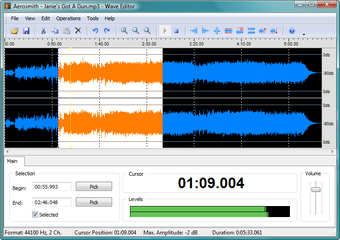
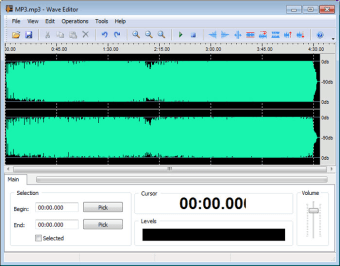
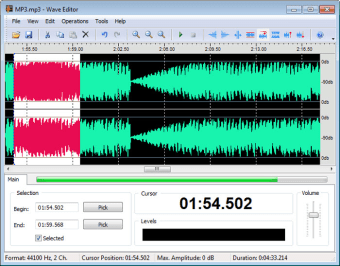
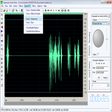
The design and interface of the program are also very suited for beginners. The thing that takes up the largest part of the screen is the window where you can view the waveform of the audio. At the top of that window is a menu bar with another bar below it containing command icons. Below the waveform viewing window is the options menu. In these menus, you can select the beginning and end of the sound clip that you need to edit. There is also a Cursor display where it tells you the exact time in the audio file where your cursor is located. Below that is a Levels display. When the audio file is playing, the Levels display will show how loud or soft the audio file is. Finally, there is the Volume slider where users can edit the volume of the audio file.
Simple Audio editing
When I say that audio editing is simple with the Wave Editor, I mean it in both a negative and a positive way. First of all, the features that the Wave Editor are not for people who need heavy editing. You won’t have a lot of freedom when it comes to adjusting the minute details of the audio file that you have. In addition, don’t expect to be able to really control the tones and frequency of the audio that you’re editing.
All that said, it is really good at what it does as long as you don’t set your expectations too high. It can reduce the volume of your audio. It can also add silence. It’s annoying that it’s measured in milliseconds, though. You can also add a fade in and fade out effect. The process of audio editing itself is very simple, too. All you have to do is select the part you need directly from the waveform viewer and apply the effect that you want. It’s that simple.
Very Simple but Good
No other word best describes Wave Editor better than simple, and as mentioned above, this can be both good and bad. It may not be as powerful as other audio editors, but for what it offers, it’s pretty good. Since it’s free, I recommend giving it a shot.